How to Track Employee Leave Balance So Employees Know Their Entitlements
September 3, 2026 | By Gopareto Marketing
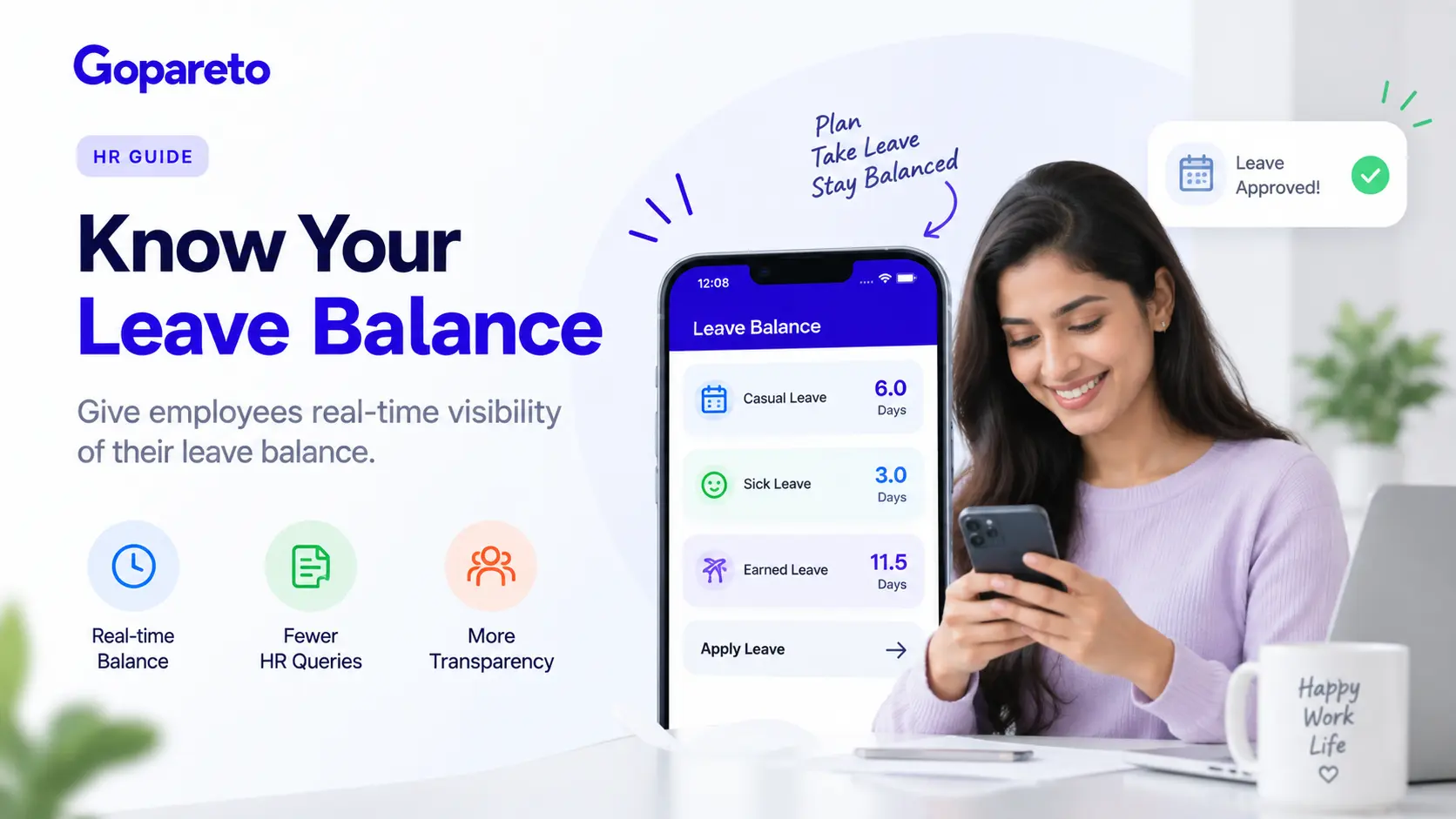
One of the most common questions HR managers receive is: "How much leave do I have left?"
When employees don’t know their leave balance, several problems emerge: constant HR inquiries, disputes about time off, stressed employees, and potential compliance issues. Most importantly, employees feel kept in the dark about something that directly affects them.
The solution is simple: enable employees to track their own leave balance in real-time. This guide shows you how to set up a system where employees always know exactly where they stand.
Why Employees Need to Know Their Leave Balance
Before diving into the how-to, let’s understand why this matters so much.
In most businesses, "How much leave do I have?" is in the top 5 most-asked HR questions. When employees can track their leave balance themselves through a self-service portal, HR teams spend less time answering repetitive questions and more time on strategic work.
When employees don’t know their balance and are denied leave, they feel disrespected. They might claim they didn’t know they’d used their allocation. Digital transparency prevents this entirely—employees see it themselves.
Employees can plan ahead when they know their balance. This helps them request leave at better times and reduces last-minute disruptions to your operations.
When you make information transparent and readily available, employees trust you more. It signals that you have nothing to hide and respect their right to know what’s theirs.
Many jurisdictions require that you inform employees of their remaining leave entitlements regularly. A transparent system automatically meets this requirement.
Manual tracking of leave balance is error-prone. Spreadsheets get overwritten, calculations get wrong, and records get lost. A digital system prevents these mistakes.
How Leave Balances Work: The Basics
To track employee leave balance properly, you need to understand how leave works:
Leave Accrual
Most employees accrue leave over time. For example:
- 20 days annual leave per year = 1.67 days per month
- 10 days sick leave per year = 0.83 days per month
- 5 days personal leave per year = 0.42 days per month
Leave accrues on each pay date or each month, depending on your policy.
Leave Usage
When an employee takes leave, it reduces their balance. If they take 3 days of annual leave, their annual leave balance drops by 3 days.
Leave Carryover
Some jurisdictions allow employees to carry over unused leave to the next year (with limits). Others require employees to use it or lose it. Your system must enforce your specific rules.
Leave Entitlements vs. Accrued Leave
Entitlements are what employees are contractually due (e.g., 20 days per year). Accrued leave is what they’ve actually earned so far this year. The system must track both.
Step-by-Step: How to Track Employee Leave Balance
1. Define Your Leave Policy Clearly
Start by documenting exactly how leave works in your organization.
What to define
- Annual leave days (total per year)
- Accrual rate (monthly, bi-weekly, or annual)
- Sick leave allocation and rules
- Compassionate leave and how it’s handled
- Public holidays and how they’re counted
- Carry-over rules (can leave be carried over? By how many days? What’s the deadline?)
- Forfeiture rules (what happens to unused leave?)
- Statutory minimums (ensure your policy meets local law)
Document this in writing so there’s no ambiguity. This is the foundation for accurate tracking.
2. Choose the Right Tracking System
You can track leave balance in several ways:
Option A: Spreadsheet (Least Recommended)
- Pros: No software cost
- Cons: Error-prone, not transparent to employees, hard to maintain, no audit trail
- Best for: Micro-businesses with 1-2 employees
Option B: Simple Leave Request Tool (e.g., Google Forms + Sheet)
- Pros: Low cost, simple to set up
- Cons: No real-time balance visibility, manual calculations, limited reporting
- Best for: Very small teams with basic needs
Option C: Dedicated HR Software with Leave Management (Recommended)
- Pros: Real-time balance visibility, automatic accrual, employee self-service, audit trail, compliance-ready
- Cons: Monthly cost
- Best for: Any business wanting reliability and compliance
The key benefit of dedicated HR software is that it handles complex calculations automatically and gives employees real-time access to their balance.
3. Set Up Automatic Accrual
This is crucial for accuracy. When leave accrues automatically:
- Calculations are consistent and error-free
- Employees see their balance update on a predictable schedule
- No manual intervention required
- Audit trail is clear if there’s ever a dispute
How automatic accrual works
- System calculates daily or monthly accrual based on your policy
- On each pay date or monthly date, accrued leave is added to the employee’s balance
- Employees can immediately see the updated balance
- Historical records show when leave was accrued
If you’re using spreadsheets or simple tools, you’ll need to manually update accruals. This creates opportunities for error.
4. Create an Employee Self-Service Portal
The heart of transparency is giving employees easy access to their own data. Your leave management system should include a self-service portal where employees can:
View their leave balance
- Current balance (days remaining)
- Annual allocation (total days)
- Days used so far this year
- Days accrued so far this year
- Carryover balance (if applicable)
See their leave history
- All leave taken this year (dates and days)
- All pending requests
- All approved leave
- Historical data from previous years
Request and manage leave
- Submit leave requests (with dates and reason if required)
- See request status (pending, approved, rejected)
- Cancel requests if needed
- Export leave records if needed for personal records
The key is making this accessible and easy to understand. Simple is better than fancy.
5. Implement Clear Approval Workflows
Leave requests should follow a clear, consistent process:
Typical workflow
- Employee requests leave (via self-service portal)
- Manager receives notification and reviews
- Manager approves or rejects
- Employee receives notification
- Balance is automatically updated (on approved requests)
- HR receives records for documentation
Make sure your system
- Prevents double-booking (employee can’t use more than their balance)
- Sends automatic notifications at each step
- Maintains a complete audit trail
- Integrates with payroll (so you’re not paying for leave taken)
- Handles various leave types correctly
6. Handle Different Leave Types Correctly
Most organizations have multiple types of leave:
Annual/Paid Leave: Days employees can use for any reason Sick Leave: Days for illness (often has usage restrictions) Personal Leave: Days for personal matters Maternity/Paternity Leave: Special leave with different rules Bereavement/Compassionate Leave: Leave for family losses Special Leave: Long service leave, sabbatical, etc.
Your system must track each separately because:
- Accrual rates differ by leave type
- Usage rules differ (can you mix types? Can you delay sick leave?)
- Carryover rules differ (some leave doesn’t carry over)
- Statutory requirements differ
Don’t make the mistake of combining all leave into one "bucket." That’s how errors happen.
7. Set Up Notifications and Reminders
Proactive communication prevents problems. Configure your system to:
Notify employees when
- Leave is accrued (they can see their updated balance)
- Leave is about to expire (if you have carryover limits)
- They’re approaching their annual leave minimum (reminding them to take time off)
- Their leave request is approved or rejected
- Someone has requested to swap shifts
- Leave records are being finalized for year-end
Notify managers when
- An employee requests leave
- Multiple team members request the same dates
- Leave balance is getting low
- Upcoming leave deadlines approach
These notifications keep everyone in the loop and prevent surprises.
8. Plan for Leave Year-End
Every year, you need to reconcile leave balances and handle carryover.
Year-end process
- Calculate any forfeiture (if unused leave is lost)
- Apply carryover limits (if leave can be carried forward)
- Reset accruals for the new year
- Send employees a final leave statement showing:
- Leave used during the past year
- Leave forfeited (if any)
- Leave carried forward (if allowed)
- New year allocation
Confirm all numbers match your payroll records
This is critical for compliance. Many employment disputes arise from confusion about leave balance at year-end. A clear, transparent process prevents this.
9. Integrate With Payroll
Leave balance and payroll must be integrated. Why?
- If payroll processes payment for work not done, you need to deduct it from accrued leave
- If an employee is paid out unused leave when they leave, payroll needs to know the correct balance
- If leave is paid (not taken), it needs to be deducted from balance
- Bonus calculations might need to exclude leave-taken periods
Common integration points
- Pay run shows days of leave vs. days worked
- Leave not taken is deducted from balance in the system
- Final payment when employee leaves includes calculation of unused leave payout
- Tax calculations account for leave
Without integration, your leave balance system becomes unreliable.
10. Maintain Accurate Records
Documentation is essential for compliance and dispute resolution.
Records to maintain
- Leave policy (dated, signed, communicated)
- Employee leave balances (current and historical)
- All leave requests and approvals
- All leave taken (dates, days, type)
- Year-end leave statements
- Any adjustments or corrections made
- Carryover details
- Payout details when employee leaves
Keep these records for at least the period required by your jurisdiction (typically 3-7 years).
Common Mistakes in Leave Balance Tracking
Treating all leave the same
Different leave types have different rules. Don’t combine them into one bucket.
Manual calculations
Manual tracking is error-prone. Use a system that calculates automatically.
Not communicating the policy clearly
Employees don’t understand how leave works, so they don’t trust the numbers. Make your policy clear and transparent.
Forgetting to update records
When you make adjustments (like adding compassionate leave), you need to update the records immediately so the system is always accurate.
Letting leave pile up
If you don’t enforce carryover limits or encourage employees to take leave, you accumulate liability (you owe them payment). Have a clear policy.
Not integrating with payroll
If leave balance and payroll aren’t synchronized, you’ll have constant discrepancies.
Poor documentation
Without clear records, you can’t defend yourself if an employee disputes their balance.
Benefits of Real-Time Leave Balance Visibility
When employees can track their own leave balance:
Productivity: Employees don’t waste time emailing HR asking about their balance Trust: Transparency builds confidence that you’re treating them fairly Planning: Employees can plan leave requests better when they know their balance Compliance: You automatically meet documentation requirements Dispute Prevention: No more arguments about "how much leave do I have?" Efficiency: Your HR team focuses on strategic work, not answering the same question 100 times
How GoPareto Makes Leave Balance Tracking Simple
GoPareto’s leave management system handles all of this automatically:
Automatic Accrual
- Configurable accrual for each leave type
- Calculates accrual on each pay date
- Employees see updated balance immediately
Employee Self-Service
- Employees view their balance anytime
- Request leave with a few clicks
- See approval status in real-time
- No need to email HR
Multiple Leave Types
- Track annual, sick, personal, bereavement, maternity, and custom leave types
- Different accrual rates and carryover rules per type
- Automatic enforcement of limits
Manager Approval Workflow
- Managers review and approve/reject leave requests
- System prevents double-booking
- Automatic notifications at each stage
Payroll Integration
- Leave data feeds into payroll automatically
- Payments and leave balance stay synchronized
- Final payout calculation is automatic
Compliance Ready
- Maintains audit trail of all leave activity
- Generates leave statements automatically
- Supports multiple jurisdictions and their specific rules
Final Thoughts: Transparency Builds Trust
When you track employee leave balance with transparency and accuracy, you’re not just simplifying HR administration. You’re demonstrating that you respect your employees and have nothing to hide.
Employees who can see their leave balance, request leave easily, and get quick approvals feel valued. They’re more likely to stay with your company and recommend it to others.
Start by clarifying your leave policy. Then move to a system that gives employees real-time access to their own data. The reduction in HR questions and increase in employee satisfaction will pay for itself immediately.
Ready to eliminate leave balance confusion?
How GoPareto Helps
GoPareto’s leave management system gives employees real-time visibility into their balance while simplifying your HR work. Explore GoPareto’s leave management features today.
Request a DemoVisit Us
GoPareto - Simple & Complete Business Management solution, Omkar Nandan Apartment, A1 201, near Navale Bridge, Kudale Baug, Narhe, Pune, Maharashtra 411041.
Related Blogs